
Honda Fit: Output Shaft (Countershaft) Speed Sensor Replacement (A/T)
-
Remove the air cleaner assembly.
-
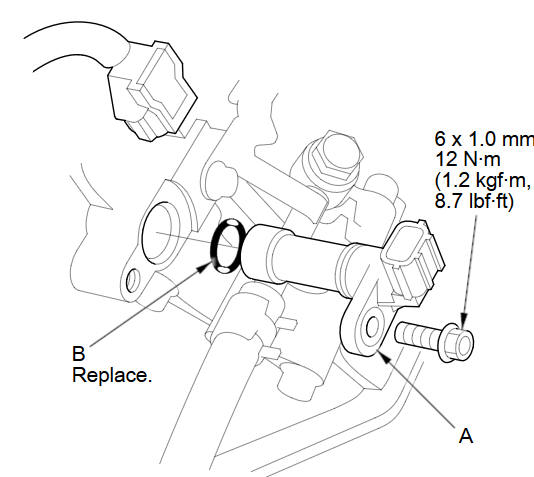
Disconnect the output shaft (countershaft) speed sensor connector, and remove the output shaft (countershaft) speed sensor (A).
-
Install a new O-ring (B) on the new output shaft (countershaft) speed sensor, then install the output shaft (countershaft) speed sensor.
-
Check the connector for rust, dirt, or oil, then connect the connector securely.
-
Install the air cleaner assembly.
See also:
Transmission Fluid
Automatic Transmission Fluid
Check the fluid level with the engine at normal operating temperature.
1. Park the vehicle on level ground.
Start the engine, let it run until the radiator fan comes ...
A/T Differential Backlash Inspection (A/T)
Install the driveshaft and intermediate shaft into the differential
assembly, and place the axles on V-blocks (A).
Measure the backlash of the pinion gears (B) wit ...
Immobilizer System
The immobilizer system protects your vehicle from theft. If an improperly-coded
key (or other device) is used, the engine’s fuel system is disabled.
When you turn the ignition switch to the ON (I ...
Categories
