
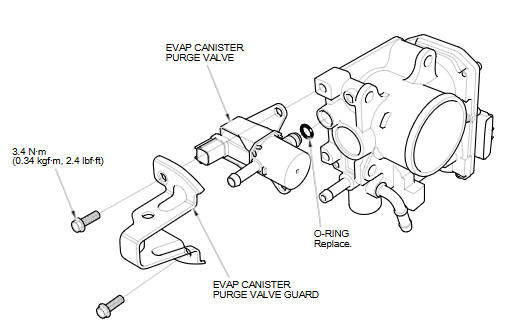
Honda Fit: Throttle Body Disassembly/Reassembly
Second generation (2007-2026) / Honda Fit 2007-2026 Repair Manual / Powertrain / Internal Combustion Powertrain Control / Engine Control / Air Metering/Acceleration / Throttle Body Disassembly/Reassembly
See also:
Protecting Adults and Teens
Introduction
The following pages provide instructions on how to properly protect the driver,
adult passengers, and teenage children who are large enough and mature enough to
drive or ride in the ...
Map Display Commands
Display current location (shows current
latitude, longitude, and elevation)
Display/Hide (specify icon type):
ATM
gas station
restaurant
post office
grocery store
lodging (hotel, motel)
parki ...
Parking Brake
To apply the parking brake, pull the lever up fully. To release it, pull up slightly,
push the button, and lower the lever. The parking brake indicator on the instrument
panel should go out when ...
Categories

© 2026 Copyright www.hfitinfo.com