
Honda Fit: Rocker Arm and Shaft Disassembly/Reassembly
NOTE:
-
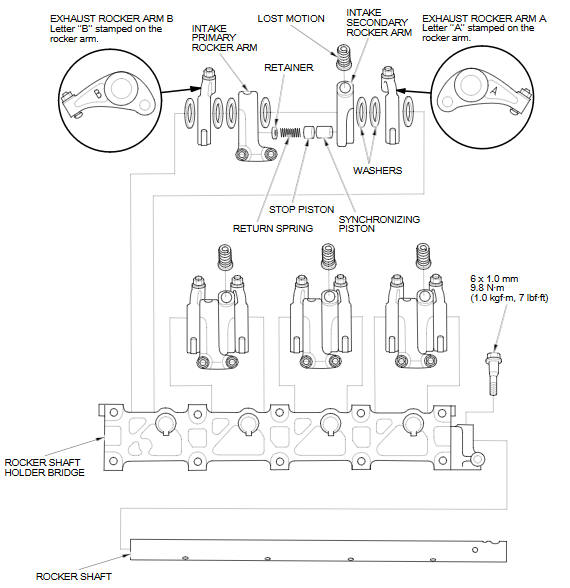
Identify each part as it is removed so that each item can be reinstalled in its original location.
-
Inspect the rocker arm shaft and the rocker arms.
-
If reused, the rocker arms must be installed in the their original locations.
-
Remove the rocker shaft bolt before removing the rocker shaft from the rocker shaft holder bridge.
-
Prior to reassembling, clean all the parts in solvent, dry them, and apply new engine oil to any contact points, the bearing surfaces, and lost motions.
-
When replacing the rocker arm assembly, remove the fastening hardware from the new rocker arm assembly.
See also:
Engine Coolant
Adding Engine Coolant
If the coolant level in the reserve tank is at or below the MIN line, add coolant
to bring it up to the MAX line.
Inspect the cooling system for leaks.
Always use Honda Lo ...
Safety Labels
These labels are in the locations shown. They warn you of potential hazards that
could cause serious injury or death. Read these labels carefully.
If a label comes off or becomes hard to read (exce ...
Fuel Tank Replacement
Drain the fuel tank until it is less than half full.
Reinstall the fuel tank unit without connecting the fuel tank unit 4P
connector and the quick-connect fitting (feed l ...
Categories
