
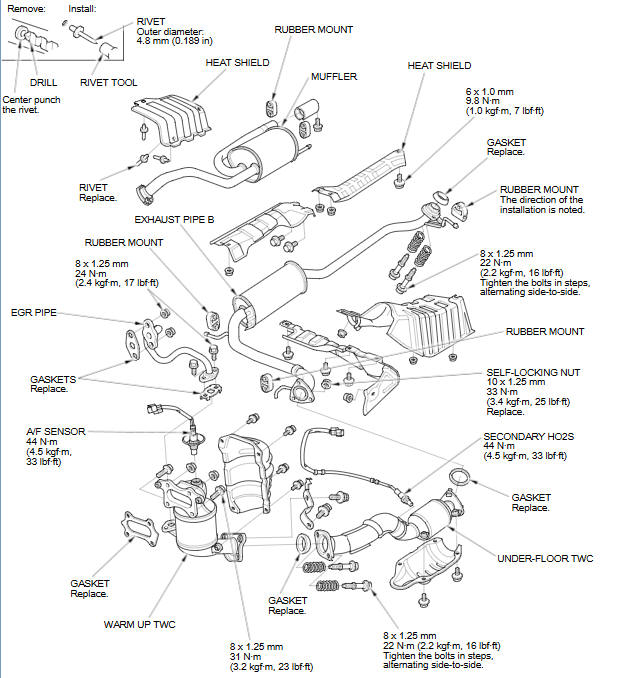
Honda Fit: Exhaust Pipe and Muffler Replacement
NOTE: Use new gaskets and self-locking nuts when reassembling.
See also:
Radio Theft Protection
Your vehicle’s audio system will disable itself if it is disconnected from electrical
power for any reason.
To make it work again, you must enter a specific five-digit code in the preset
button ...
Intermediate Shaft Reassembly (A/T)
Exploded View
Special Tools Required
Oil Seal Driver, 65 mm 07JAD-PL90100
Bearing Driver Attachment, 52 x 55 mm 07746-0010400
Bearing Driver Attachment, 35 mm I.D. 07746-0030400
Drive ...
A/T Differential Carrier and Final Driven Gear Replacement (A/T)
Remove the final driven gear (A) from the differential carrier (B). The
final driven gear bolts have left-hand threads.
Install the final driven gear on the differential carri ...
Categories
