
Honda Fit: M/T Differential Carrier/Final Driven Gear Replacement (M/T)
-
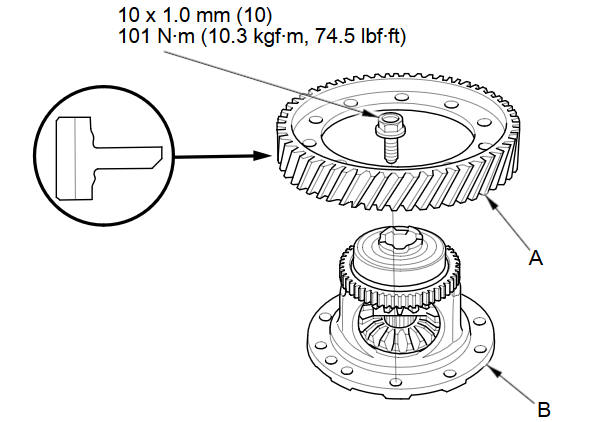
Loosen the bolts in a crisscross pattern in several steps, then remove the final driven gear (A) from the differential carrier (B).
-
Install the final driven gear with the chamfer on the inside diameter facing the carrier. Tighten the bolts in a crisscross pattern in several steps.
See also:
Voice Recognition
To achieve optimum voice recognition when using either the navigation voice
control system or Bluetooth® HandsFreeLink®:
• Make sure the correct screen is displayed for the voice command that yo ...
Important Safety Precautions
You’ll find many safety recommendations throughout this section, and throughout
this manual.
The recommendations on this page are the ones we consider to be the most important.
Always Wear Your ...
Synchro Sleeve and Hub Inspection and Reassembly (M/T)
Inspect gear teeth on all synchro hubs and the synchro sleeves for
rounded off corners, which indicate wear.
Install each synchro hub (A) in its mating synchro sleeve (B), and che ...
Categories
