
Honda Fit: Auxiliary Input Jack
U.S. Sport and all Canadian models
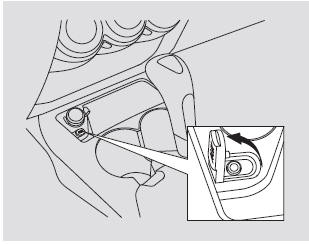
The auxiliary input jack is underneath the accessory power socket in the center pocket. The system will accept auxiliary input from standard audio accessories.
When a compatible audio unit is connected to the jack, press the AUX button to select it.
See also:
A/T Differential Carrier and Final Driven Gear Replacement (A/T)
Remove the final driven gear (A) from the differential carrier (B). The
final driven gear bolts have left-hand threads.
Install the final driven gear on the differential carri ...
Main Valve Body Disassembly, Inspection, and Reassembly (A/T)
Clean all parts thoroughly in solvent, and dry them with compressed air.
Blow out all passages.
Do not use a magnet to remove the check balls, it may magnetize the check
balls. ...
Breather Line and Suction Line Inspection (Page-1)
Special Tools Required
Fuel Pressure Gauge Attachment Set 07AAJ-S6MA150
Vacuum Pump/Gauge, 0-30 inHg Snap-on YA4000A or equivalent, commercially
available
Vacuum/Pressure Gauge, 0-4 inHg 07 ...
Categories
