
Honda Fit: Changing the Currently Paired Phone
 PHONE button
► Phone Setup ► Add/Select a phone
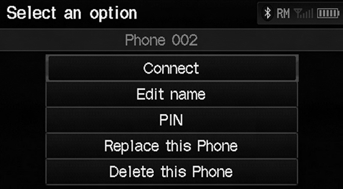
1. Select List under Paired Phone List.
2. Select a phone to connect.
3. Select Connect.
► HFL disconnects the linked phone and starts connecting to another paired phone.
If no other phones are found or paired when trying to switch to another phone, HFL will inform you that the original phone is linked again.
See also:
Map Scale Commands
Display north up
Display heading up
Display zoom in
Display zoom out
Display (specify scale):
1/20 mile (80 m) scale
1/8 mile (200 m) scale
1/4 mile (400 m) scale
1/2 mile (800 m) scale
1 mil ...
Transmission Range Switch Replacement (A/T)
Raise the vehicle on a lift, or apply the parking brake, block the rear
wheels, and raise the front of the vehicle. Make sure it is securely
supported.
Shift to N.
...
Throttle Body Removal/Installation
caution
Do not insert your fingers into the installed throttle body when you
turn the ignition switch to ON (II) or while the ignition switch is in
ON (II). If you d ...
Categories
