
Honda Fit: Calculating the Route on the Destination Map
Calculate the route from the map of the destination address.
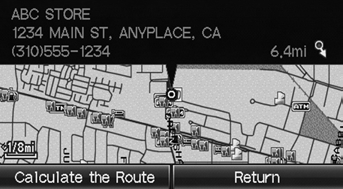
Select Calculate the Route.
► The system calculates and displays the route line on the map screen.
 “Display Destination Map” (when
en route)
See also:
Charging System Indicator
If the charging system indicator comes on brightly when the engine is running,
the battery is not being charged.
Immediately turn off all electrical accessories. Try not to use other electrically ...
Adjusting the Seats
WARNING
Sitting too close to a front airbag can result
in serious injury or death if the front
airbags inflate.
Always sit as far back from the front
airbags as possible while maintaining
cont ...
Obtaining Navigation Update Data
Honda is continually expanding the scope
of the navigation system. Navigation
system software upgrades may be made
available periodically, usually in the fall of
each year.
To purchase an updat ...
Categories
