
Honda Fit: Language
 INFO button
► Setup ►Other
►Language
Set the system language used on all screens. You can choose from three languages: English, Français (French), Español (Spanish).
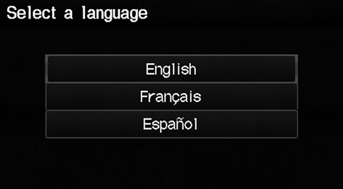
Select the system language.
Voice confirmation of cities and streets only occurs when English is the system language.
When Français or Español is selected, some messages continue to be displayed in English.
See also:
Changing the Pairing Code
PHONE button
► Phone Setup ► Add/Select a phone
1. Select Edit under Pairing Code.
2. Select an item.
The following items are available:
• Random: Uses a randomly generated pai ...
Phone Setup
PHONE button
► Phone Setup
Set HFL options and features.
1. Select an item.
2. Select OK.
The following items are available:
• Bluetooth Setup: Pairs your phone to the system.
• B ...
Seat Belt Inspection
Out of Vehicle
For front seat belt retractors with seat belt tensioners,
review the SRS component locations and
the precautions and procedures before doing
repairs or serv ...
Categories
