
Honda Fit: Remote Transmitter Care
Replacing the Battery
If the indicator does not come on when the button is pressed, replace the battery.
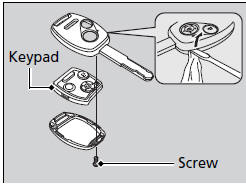
Battery type: CR1616
1. Unscrew the cover with a small Phillipshead screwdriver.
► Wrap the small flat-tip screwdriver with a cloth to prevent scratching the transmitter.
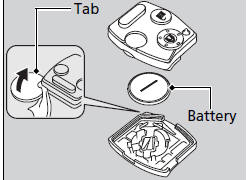
2. Open the keypad.
► Wrap a coin with a cloth to prevent scratching the transmitter.
3. Make sure to replace the battery with the correct polarity.
NOTICE
An improperly disposed of battery can damage the environment. Always confirm local regulations for battery disposal.
Replacement batteries are commercially available or at a dealer.
See also:
Charging System Indicator
If the charging system indicator comes on brightly when the engine is running,
the battery is not being charged.
Immediately turn off all electrical accessories. Try not to use other electrically ...
Fuel Line/Quick-Connect Fitting Precautions
The fuel line/quick-connect fittings (A, B, C, D, E, F, G, H, I, J, K and L)
connect the fuel rail (M) to fuel feed hose (N), the fuel feed hose to the fuel
line (O), the fuel feed line (P) to the ...
Mercedes-Benz C-Class Coupe review
The Mercedes C-Class Coupe encapsulates all the excellence of the sedan, packaged in an attractive exterior. Discover why it stands out as one of the most desirable mid-size coupes with our expert r ...
Categories
