
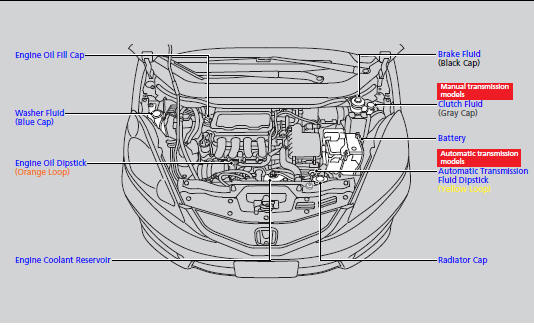
Honda Fit: Maintenance Items Under the Hood
Second generation (2007-2026) / Honda Fit 2007-2026 Owners Manual / Maintenance / Maintenance Under the Hood / Maintenance Items Under the Hood
See also:
DOT Tire Quality Grading (U.S. Vehicles)
The tires on your vehicle meet all U.S. Federal Safety Requirements.
All tires are also graded for treadwear, traction, and temperature performance
according to Department of Transportation (DOT) s ...
Ignition Switch
Manual transmission models
WARNING
Removing the key from the ignition switch
while driving locks the steering. This can
cause you to lose control of the vehicle.
Remove the key from the ignit ...
Tools
Types of Tools
The tools were stored in the cargo area. ...
Categories

© 2026 Copyright www.hfitinfo.com