
Honda Fit: Features
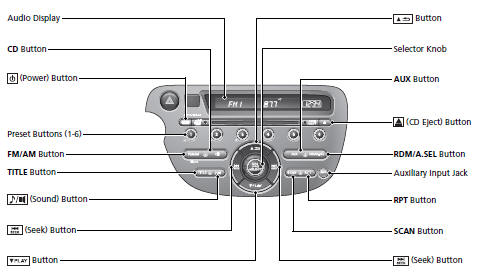
Audio System
For navigation system operation 
See Navigation System Manual
See also:
Jump Starting
Although this seems like a simple procedure, you should take several precautions.
A battery can explode if you do not follow the correct procedure, seriously
injuring anyone nearby.
Keep all spa ...
Clutch Pedal, Clutch Pedal Position Switch, and Clutch Interlock Switch
Adjustment (M/T)
NOTE:
For a cruise control problem, check the clutch pedal position switch.
For a clutch interlock operation problem, check the clutch interlock
switch.
Remove the driver' ...
Map Screen
...
Categories

© 2026 Copyright www.hfitinfo.com