
Honda Fit: Transmission Side - Release Bearing Installation
-
Apply high temp urea grease (P/N 08798-9002) to the release fork (A), the release fork bolt (B), the release bearing (C), and the release bearing guide (D) in the shaded areas, then set the release fork set spring (E).
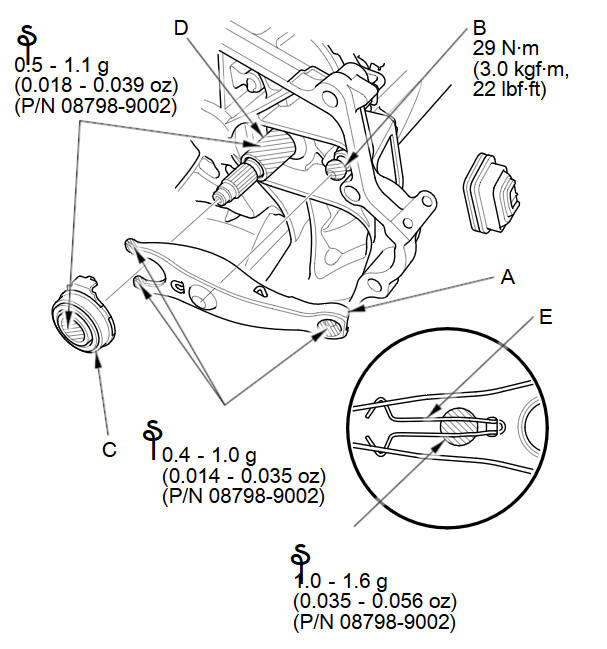
NOTE: Replace the release fork bolt if necessary.
-
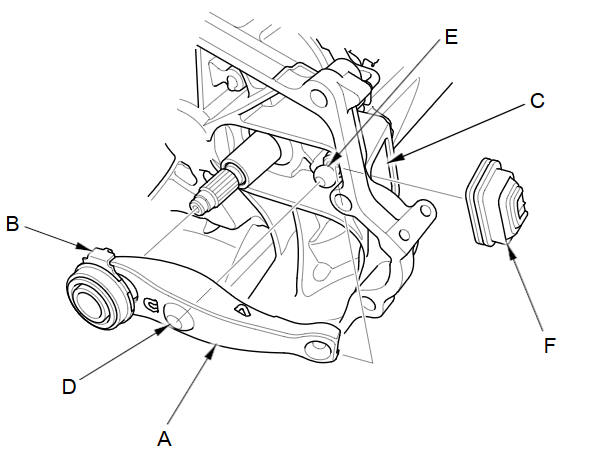
With the release fork (A) slid between the release bearing pawls (B), install the release bearing on the mainshaft while inserting the release fork through the hole (C) in the clutch housing.
-
Align the detent (D) of the release fork with the release fork bolt (E), then press the detent of the release fork over the release fork bolt squarely.
-
Install the release fork boot (F). Make sure the boot seals around the release fork and clutch housing.
-
Move the release fork (A) right and left to make sure that it fits properly against the release bearing (B), and that the release bearing slides smoothly.
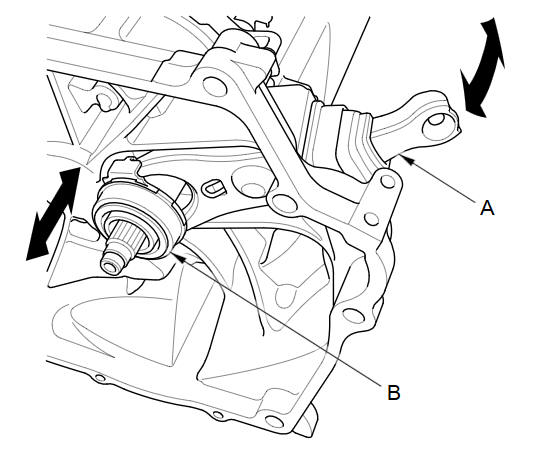
NOTE: Wipe off any excess grease.
-
Install the transmission.
See also:
Front bumper:
@font-face{font-family:
"Honda_SymbolMarkeng";src:url(/statics/ho_prod_2/txt/Honda_SymbolMark_enu3.txt);}@font-face{font-family:
"H ...
Tailgate Lock Cylinder Replacement
For Some Models
NOTE: Put on gloves to protect your hands.
Remove the tailgate lower trim panal.
Disconnect the tailgate cylinder rod (A).
NOTE: Check for damaged or stress-wh ...
Headliner Removal/Installation (General information)
Special Tools Required
KTC Trim Tool Set SOJATP2014
*Available through the Honda Tool and Equipment Program; call 888-424-6857
SRS components are located in this area. Review the SRS ...
Categories
