
Honda Fit: Flywheel Replacement
-
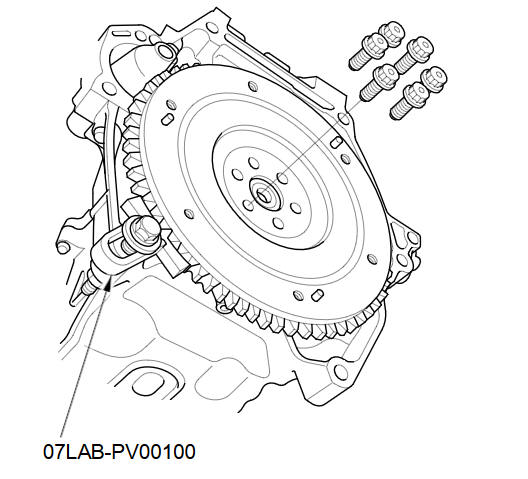
Install the ring gear holder.
-
Loosen the flywheel mounting bolts in a crisscross pattern in several steps. Remove the bolts, then remove the flywheel and the ring gear holder.
-
Install the flywheel on the cranksha9t, and install the mounting bolts finger-tight.
-
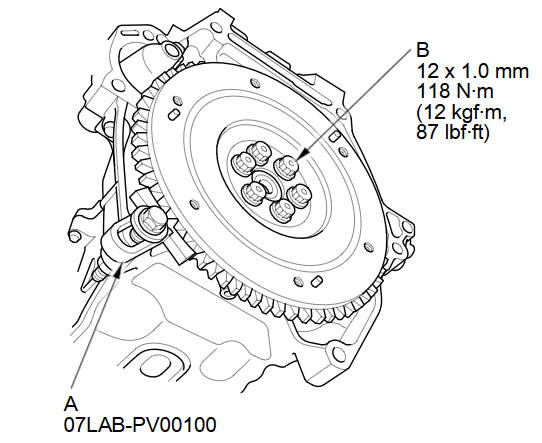
Install the ring gear holder (A), then tighten the flywheel mounting bolts (B) in a crisscross pattern in several steps.
See also:
Manual transmission models Shifting
■Shift Lever Operation+
Fully depress the clutch pedal to operate the shift lever and change gears,
then
slowly release the pedal.
Depress the clutch pedal, and pause for a few seconds be ...
Using the Key*
Insert the key in the cylinder to lock and
unlock the tailgate. ...
Gauges
TripMeter
This meter shows the number of miles (U.S.) or kilometers (Canada) driven since
you last reset it.
There are two trip meters: Trip A and Trip B. Switch between these displays by
pres ...
Categories
