
Honda Fit: A/F Sensor Replacement
Special Tools Required
- O2 Sensor Wrench Snap-on S6176 or equivalent, commercially available
-
Remove the cowl cover and the under-cowl panel.
-
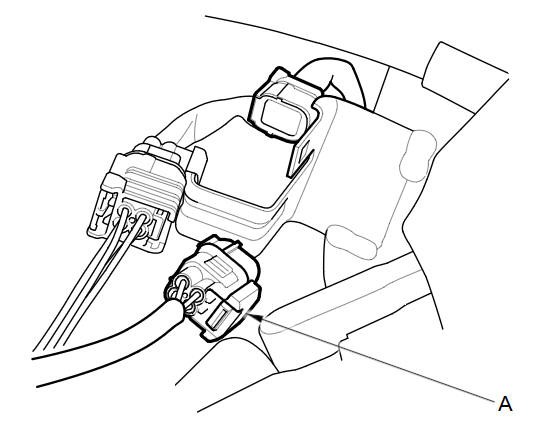
Disconnect the A/F sensor connector (A).
-
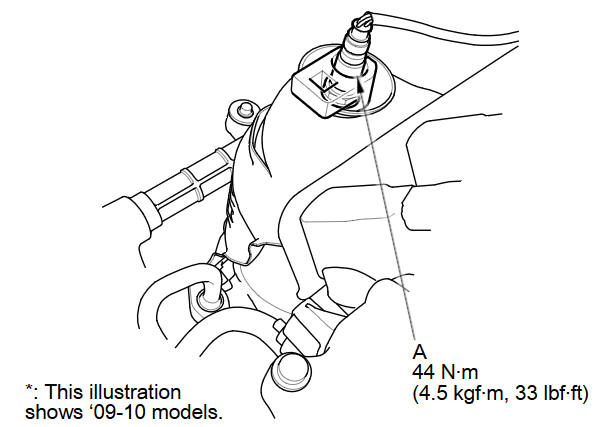
Remove the A/F sensor (A).
-
Install the parts in the reverse order of removal.
See also:
Flywheel Inspection
Remove the ring gear holder.
Inspect the ring gear teeth for wear and damage.
Inspect the clutch disc mating surface on the flywheel for wear, cracks,
and burning.
...
Receiver/Dryer Desiccant Replacement (With A/C)
NOTE: Install the receiver/dryer as quickly as possible to prevent the system
from absorbing moisture from the air.
Remove the A/C condenser.
Remove the bolts from the A/C cond ...
Controls
Turn Signals
Turn Signal Control Lever
Lights
Light Control Switches
Wipers and Washers
Wiper/Washer Control Lever
MIST
OFF
INT: Low speed with intermittent
LO: Low speed wipe
HI: High ...
Categories
