
Honda Fit: Drive Belt Auto-Tensioner Inspection
-
Turn the ignition switch to ON (II), and make sure to turn the A/C switch OFF, then turn the ignition switch to LOCK (0).
-
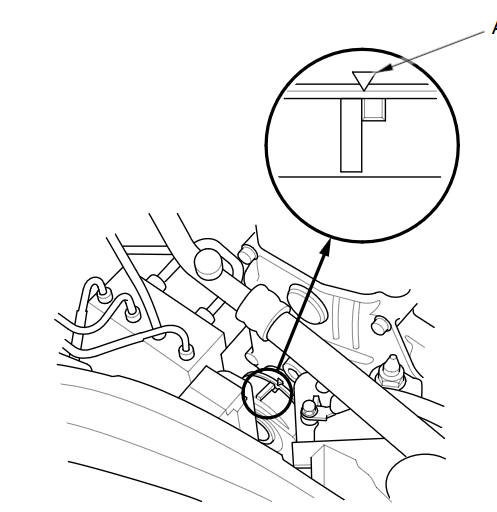
Check the position of the auto-tensioner indicator (A). Start the engine, then check the position again with the engine idling. If the position of the indicator moves or fluctuates a lot, replace the auto-tensioner.
-
Check for abnormal noise from the tensioner pulley. If you hear abnormal noise, replace the auto-tensioner pulley.
-
Remove the drive belt.
-
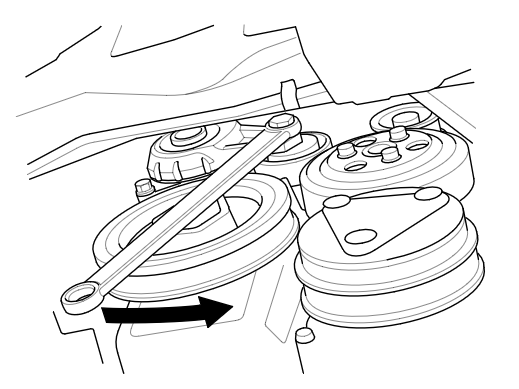
Move the auto-tensioner within its limit with a wrench in the direction shown. Check that the auto-tensioner moves smoothly and without any abnormal noise. If the tensioner does not move smoothly, or you hear abnormal noise, replace the auto-tensioner.
-
Remove the auto-tensioner.
-
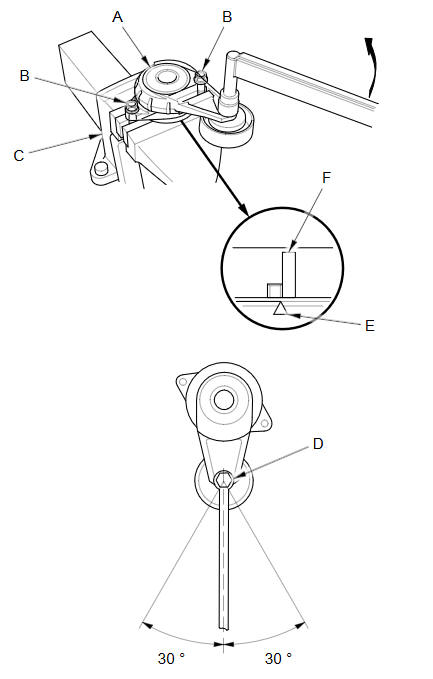
Clamp the auto-tensioner (A) by using two 8 mm bolts (B) and a vise (C) as shown. Do not clamp the auto-tensioner itself.
-
Attach the torque wrench (D) on the pulley bolt, and align it as shown.
-
Align the indicator (E) on the tensioner base with belt position mark (F) on the tensioner arm by using the torque wrench, and measure the torque. If the torque value is out of specification, replace the auto-tensioner.
NOTE: If the indicator exceeds the belt position mark, recheck the torque.
Auto-tensioner Spring Torque
20.6пјЌ25.2 NВ·m (2.10пјЌ2.25 kgfВ·m, 15.2пјЌ18.6 lbfВ·ft)
-
Install the auto-tensioner.
-
Install the drive belt.
See also:
Obtaining Navigation Update Data
Honda is continually expanding the scope
of the navigation system. Navigation
system software upgrades may be made
available periodically, usually in the fall of
each year.
To purchase an updat ...
Mainshaft Assembly Clearance Inspection (M/T)
NOTE: If replacement is required, always replace the synchro sleeve and the
synchro hub as a set.
Support the bearing inner race with an appropriate size socket (A), and
push down on the m ...
Audio
This section describes how to operate the audio system. You can play
music from a wide array of media sources, and control the audio system
using the audio buttons, the touch screen, or voice contro ...
Categories
