
Honda Fit: Armrest
■Using the Driver’s Seat Armrest*
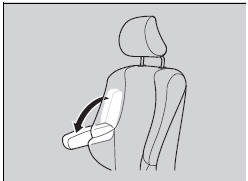
Pull down the armrest.
See also:
Parking Your Vehicle
Do not park your vehicle near flammable objects,
such as dry grass, oil, or timber.
Heat from the exhaust can cause a fire.
When Stopped
1. Depress the brake pedal firmly.
2. Firmly apply the p ...
Ignition Switch Replacement
NOTE: SRS components are located in the area. Review the
SRS component locations, and
precautions and procedures before doing repairs or
servicing.
Do the battery terminal di ...
Troubleshooting
Why does the vehicle position icon on the map “lag” a
short distance behind my actual position, especially at
intersections?
This is normal. The navigation system is unaware of the
width o ...
Categories

© 2026 Copyright www.hfitinfo.com