
Honda Fit: List of Categories
Second generation (2007-2026) / Honda Fit 2007-2026 Navigation Online Reference Manual / Voice Commands / List of Categories
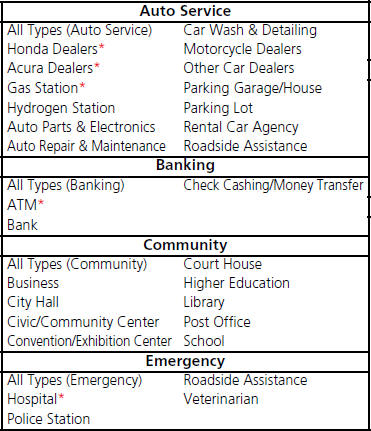
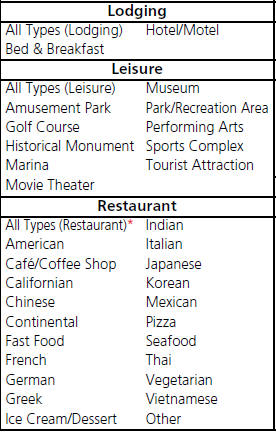
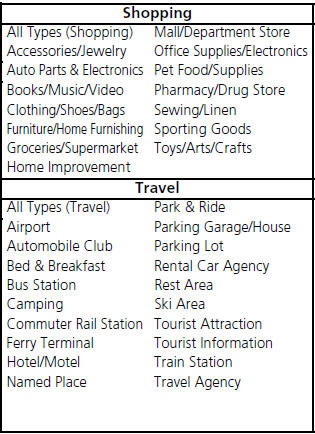
* Stored in “Fav. Subcategory” by factory default.
See also:
Your Vehicle’s Safety Features
Your vehicle is equipped with many features that work together to protect you
and your passengers during a crash.
Some features do not require any action on your part. These include a strong
st ...
Inspection
Install the nut on the damper shaft end, and set the socket wrench and
T-handle on the nut.
Compress the damper assembly by hand, and check for smooth operation
through a full ...
Automatic Transmission
Shift Lever Position Indicators
These indicators on the instrument panel show which position the shift lever
is in.
The ‘‘D’’ indicator comes on for a few seconds when you turn the ignit ...
Categories

© 2026 Copyright www.hfitinfo.com