
Honda Fit: Miscellaneous Questions
Second generation (2007-2026) / Honda Fit 2007-2026 Navigation Online Reference Manual / Troubleshooting / Miscellaneous Questions
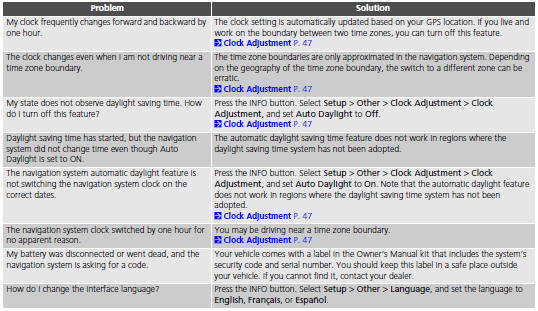
See also:
Manual Transmission Removal (M/T)
Special Tools Required
Universal Lifting Eyelet 07AAK-SNAA120
1.8 Support Bolt 07AAK-SNAA500
Engine Support Hanger, A and Reds AAR-T1256
*: Reds engine support hanger AAR-T1256 is available th ...
Coolant Replacement
Wait until the engine is cool, then carefully remove the radiator cap.
Remove the splash shield.
Loosen the drain plug (A), and drain the coolant.
Rem ...
Changing a Flat Tire
If you have a flat tire while driving, stop in a safe place to change it.
Drive slowly along the shoulder until you get to an exit or an area to stop that
is far away from the traffic lanes.
The ...
Categories

© 2026 Copyright www.hfitinfo.com