
Honda Fit: Audio Screen Control
 AUDIO button (in DISC mode)
Control the audio system through the navigation screen.
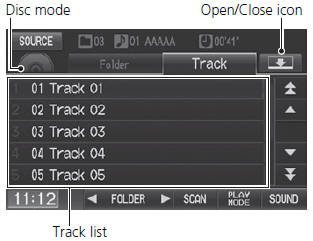
Select a track.
► Select the Folder tab to display the list of folders on M/WMA/AAC discs having a folder structure.
The following items are available, depending on the type of disc:
• FOLDER
: Select  or
or
 to select a folder on M/WMA/AAC
discs having a
folder structure.
• SCAN
:
 Scan Track: Scans all tracks on the
disc (or in the selected folder) in the
order they were recorded (stored) and plays a 10-second sample. Select Stop to
stop scanning and play the current selection.
 Scan Folder: Scans the first track
in each folder on the disc and plays a 10-
second sample. Select Stop to stop scanning and play the current selection.
• PLAY
MODE
:
 Random All: Plays all tracks on the
current disc in random order.
 Random in Folder: Plays all tracks
in the current folder in random order.
 Repeat 1 Track: Repeats the current
track.
 Repeat 1 Folder: Repeats all tracks
in the current folder.
To stop repeat- or random-play, select the current play mode button again.
• SOUND
: Displays the sound preferences screen.
• SOURCE
: Changes the source mode.
• Open
/Close
icon
: Displays/hides the detailed information.
See also:
Breather Line and Suction Line Inspection (Page-1)
Special Tools Required
Fuel Pressure Gauge Attachment Set 07AAJ-S6MA150
Vacuum Pump/Gauge, 0-30 inHg Snap-on YA4000A or equivalent, commercially
available
Vacuum/Pressure Gauge, 0-4 inHg 07 ...
Servo Body Disassembly, Inspection, and Reassembly (A/T)
Clean all parts thoroughly in solvent, and dry them with compressed air.
Blow out all passages.
Inspect the servo body for scoring and damage.
Check all valves for fre ...
Gauges
TripMeter
This meter shows the number of miles (U.S.) or kilometers (Canada) driven since
you last reset it.
There are two trip meters: Trip A and Trip B. Switch between these displays by
pres ...
Categories
