
Honda Fit: Guidance Prompts
 INFO button
► Setup
Set the number of guidance prompts before you get to the guidance point.
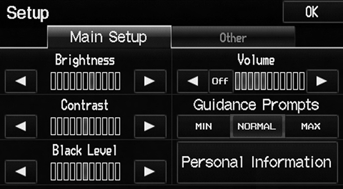
Select an option.
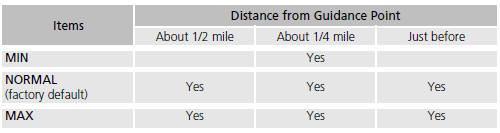
The following options are available:
To replay voice guidance, select VOICE on the map menu.
You can turn voice guidance off if you prefer.
See also:
For Safe Driving
The following pages explain your vehicle’s safety features and how to use
them
properly. The safety precautions below are ones that we consider to be among the
most important. ...
Audio Screen Control
AUDIO button (in USB mode)
Control the audio screen through the navigation system.
Select a track.
Select the Folder tab to display the
folder list.
The following items are available:
...
MTF Inspection and Replacement (M/T)
Park the vehicle on level ground, and turn the engine off.
Raise the vehicle on a lift, and make sure it is securely supported.
Remove the splash shield.
...
Categories
