
Honda Fit: Canceling Your Route
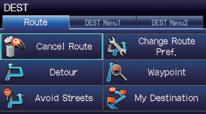
1 Press the DEST button.
2 Select Cancel Route.
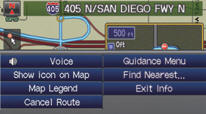
From the map screen:
1 Select MAP MENU.
2 Select Cancel Route.
See also:
Interior Trim Removal/Installation - Cargo Area
Special Tools Required
KTC Trim Tool Set SOJATP2014
*Available through the Honda Tool and Equipment Program; call 888-424-6857
NOTE:
Put on gloves to protect your hands.
Tak ...
Maintenance
This section explains why it is important to keep your vehicle well maintained
and how to follow basic maintenance safety precautions.
This section also includes instructions on how to read the mai ...
Alternator Disassembly (Page -2)
Remove the rotor (A).
@font-face{font-family:
"Honda_SymbolMarkeng";src:url(/statics/ho_prod_2/txt/Honda_SymbolMark_enu3.txt);}@font-face{font-family:
"H ...
Categories
