
Honda Fit: Shift Lever Housing Replacement (M/T)
NOTE: Take care not to scratch the center console, dashboard, and related parts.
-
Remove the center console.
-
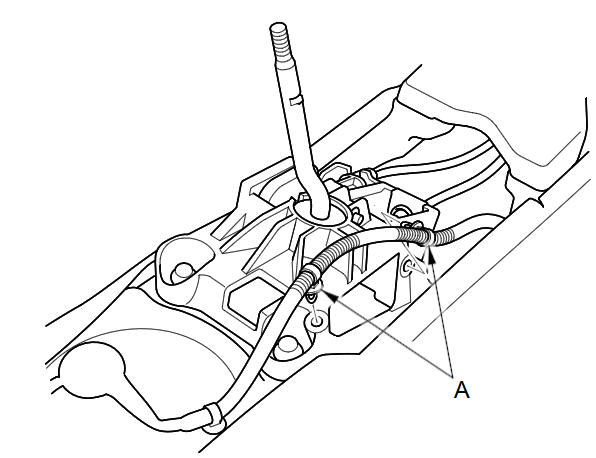
Remove the harness clamps (A).
-
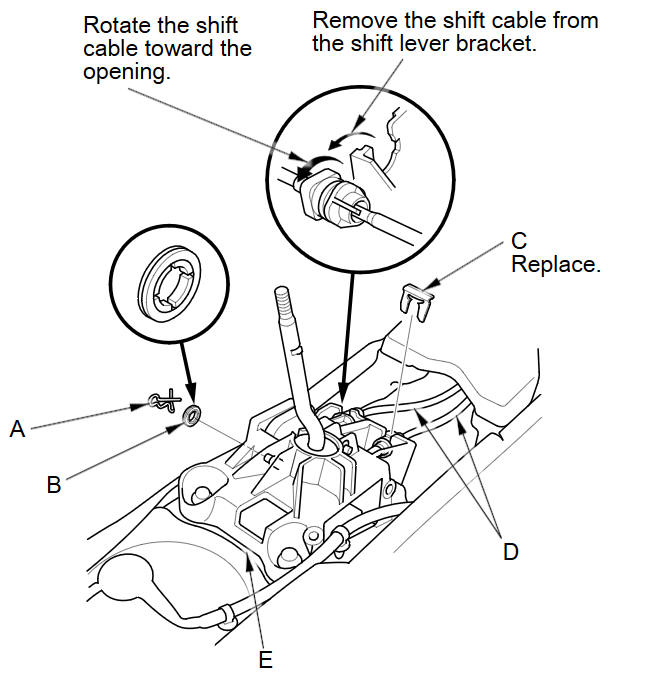
Remove the lock pin (A), the washer (B), the shift cable clip (C), and the shift cables (D) from the shift lever housing assembly (E).
-
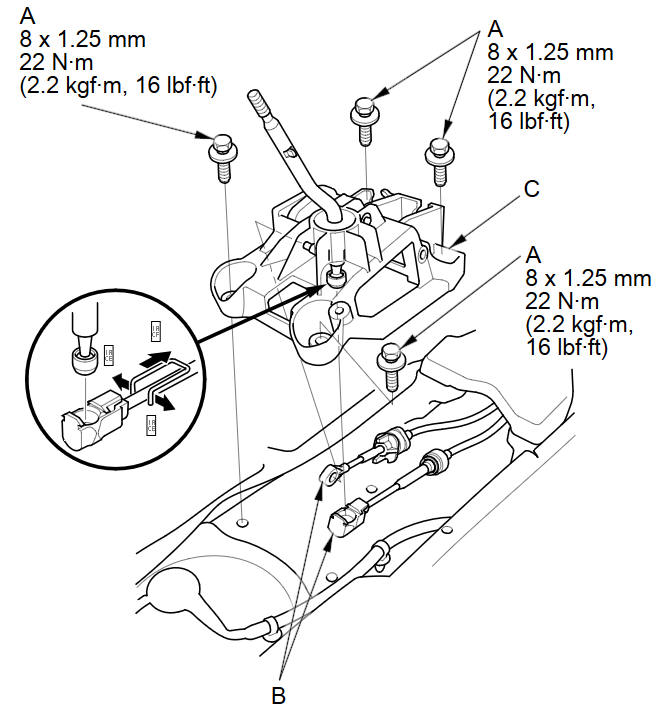
Remove the four bolts (A). Disconnect the shift cables (B) from the shift lever, then remove the shift lever housing (C).
-
Install the shift lever housing in the reverse order of removal.
See also:
Anti-lock Brakes (ABS)
The anti-lock brake system (ABS) helps prevent the wheels from locking up, and
helps you retain steering control by pumping the brakes rapidly, much faster than
a person can do it.
The electronic ...
Other Features
This section describes the useful functions incorporated into the
navigation system. ...
Shift Fork Disassembly/Reassembly (M/T)
NOTE: Prior to reassembling, clean all the parts in solvent, dry them, and
apply MTF to all contact surfaces.
...
Categories
