
Honda Fit: MAP Sensor Replacement
Second generation (2007-2026) / Honda Fit 2007-2026 Repair Manual / Powertrain / Internal Combustion Powertrain Control / Engine Control / Engine Control Sensors / MAP Sensor Replacement
-
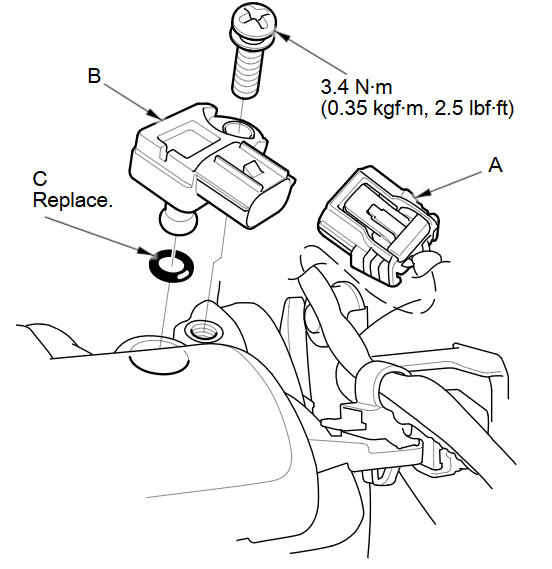
Disconnect the MAP sensor connector (A).
-
Remove the MAP sensor (B).
-
Install the parts in the reverse order of removal with a new O-ring (C).
See also:
Information
This chapter includes your vehicle’s specifications, locations of
identification numbers, and other
information required by regulation. ...
Adding Waypoints
Add up to four waypoints (pit stops) along the route to your destination.
Waypoints allow you to stop for gas or food, for
example, and then continue on to your
destination.
Press the MAP/GUID ...
As required by the FCC
1)This device complies with Part 15 of the
FCC Rules and Canadian RSS-210/RSSGen.
Operation is subject to the following
two conditions: (1) this device may not
cause harmful interference, and (2 ...
Categories

© 2026 Copyright www.hfitinfo.com