
Honda Fit: FTP Sensor Replacement
-
Remove the EVAP canister.
-
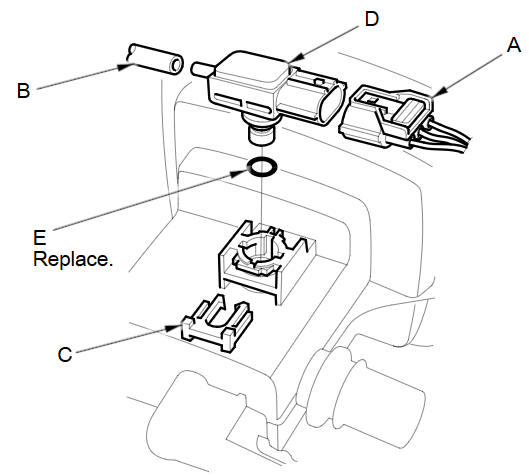
Disconnect the FTP sensor connector (A).
-
Disconnect the hose (B), remove the retainer (C), and remove the FTP sensor (D).
-
Install the parts in the reverse order of removal with a new O-ring (E).
See also:
Connecting Rod and Crankshaft End Play Inspection
Remove the oil pump.
Measure the connecting rod end play with a feeler gauge (A) between the
connecting rod (B) and the crankshaft (C).
Connecting Rod End Play
...
Disassembly
Compress the damper spring, then remove the nut (A) while holding the
damper shaft with a hex wrench (B). Do not compress the damper spring more
than necessary to remove the nut.
...
EPS System Description
EPS Control Unit Inputs and Outputs for
Connector A (11P)
@font-face{font-family:
"Honda_SymbolMarkeng";src:url(/statics/ho_prod_2/txt/Honda_SymbolM ...
Categories
