
Honda Fit: About Your Audio System
On models with navigation system, see the Navigation System Manual for operation of the audio system, and Bluetooth®HandsFreeLink®.
The audio system features FM/AM radio. It can also play audio CDs, WMA/MP3/AAC files, iPod®, and USB flash drives.
You can operate the audio system from the buttons and switches on the panel.
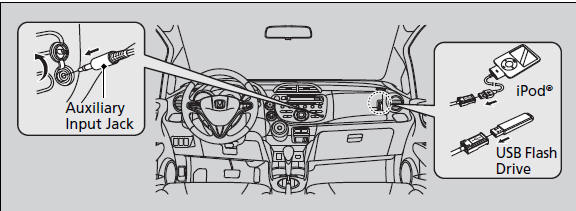
Video CDs, DVDs, and 3-inch (8-cm) mini CDs are not supported.
iPod® is a registered trademark owned by Apple Inc.
State or local laws may prohibit the operation of handheld electronic devices while operating a vehicle.
See also:
Knuckle/Hub Replacement
Raise and support the vehicle.
Remove the wheel nuts and the front wheel.
@font-face{font-family:
"Honda_SymbolMarkeng";src:url(/statics/ho_pr ...
Transmission Side - Release Bearing Removal
Remove the transmission.
Remove the release fork boot (A) from the clutch housing (B).
Squeeze the release fork set spring (C) with pliers to remove the release
...
Airbag and Tensioner Disposal
Special Tools Required
Deployment Tool 07AAZ-000A100
Before scrapping any airbags, side airbags, side curtain airbags, seat belt
tensioners (including those in a whole vehicle to be scrapped) ...
Categories
