
Honda Fit: Turn Signals
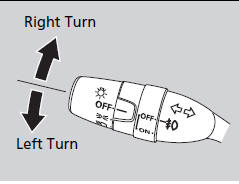
The turn signals can be used when the ignition
switch is in ON  .
.
See also:
Shifter Input and Linkage
Paddle Shifter (Downshift Switch) Replacement (A/T)
SRS components are located in this area. Review the SRS component locations
and the precautions and procedures before doi ...
Drive Belt Auto-Tensioner Pulley Replacement
Remove the auto-tensioner.
Remove the tensioner pulley.
Install the tensioner pulley in the reverse order of removal.
Install the auto-tensioner.
...
Database
The digitized map database reflects
conditions as they existed at various points
in time before production. Accordingly,
your database may contain inaccurate or
incomplete data or information due ...
Categories

© 2026 Copyright www.hfitinfo.com