
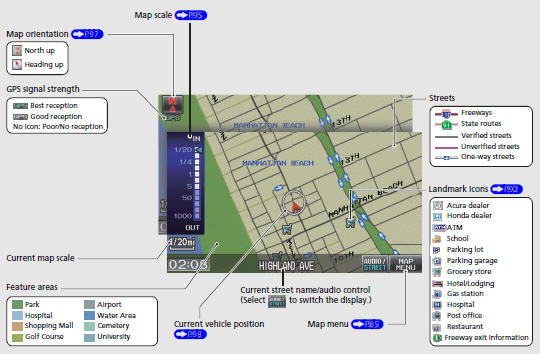
Honda Fit: Map Screen Legend
Second generation (2007-2026) / Honda Fit 2007-2026 Navigation Online Reference Manual / Quick Reference Guide / Map Screen Legend
See also:
Connecting Rod and Crankshaft End Play Inspection
Remove the oil pump.
Measure the connecting rod end play with a feeler gauge (A) between the
connecting rod (B) and the crankshaft (C).
Connecting Rod End Play
...
Models with 7 positions AT Shifting
Change the shift position in accordance with your driving needs.
■ Shift lever positions
You cannot turn the ignition switch to LOCK
and
remove the key unless the shift lever is in
.
...
Wear Indicators
The groove where the wear indicator is
located is 1/16 inch (1.6 mm) shallower than
elsewhere on the tire. If the tread has worn so
that the indicator is exposed, replace the tire.
Worn out ti ...
Categories

© 2026 Copyright www.hfitinfo.com