
Honda Fit: MAP Sensor Replacement
-
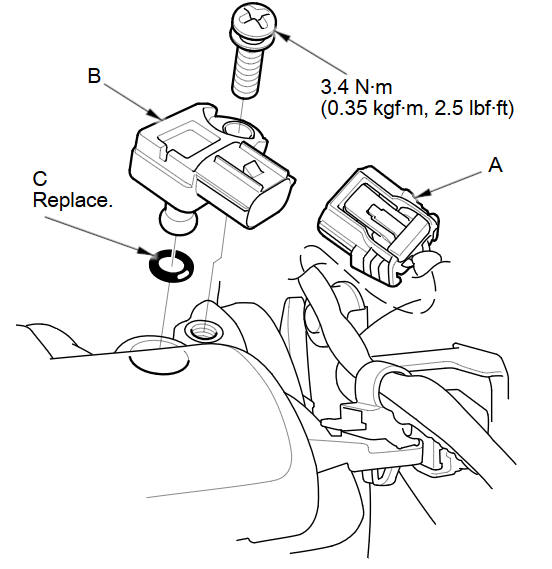
Disconnect the MAP sensor connector (A).
-
Remove the MAP sensor (B).
-
Install the parts in the reverse order of removal with a new O-ring (C).
See also:
Correct Vehicle Position
INFO button
► Setup ►Other
►Vehicle
Manually adjust the current position of the vehicle as displayed on the map
screen if
the position appears to be incorrect.
1. Put the v ...
Color
INFO button
► Setup ►Other
►Color
Choose the color of the navigation map and system menus.
Select an item.
The following items are available:
• Map: Sets the color of the ...
Rectifier Test
Check for continuity in each direction, between the B terminal and P terminals,
and between the E terminal and P terminals of each diode pair. All diodes should
have continuity in only one ...
Categories
