
Honda Fit: FTP Sensor Replacement
-
Remove the EVAP canister.
-
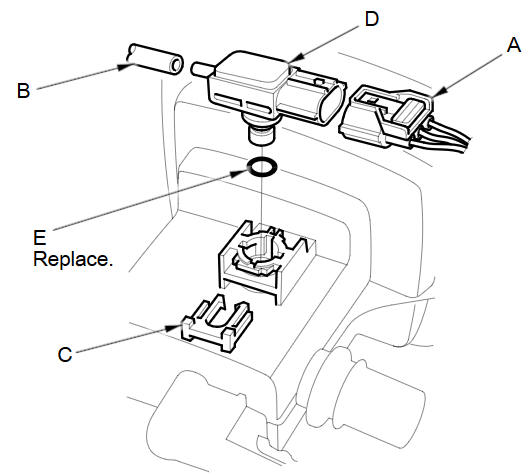
Disconnect the FTP sensor connector (A).
-
Disconnect the hose (B), remove the retainer (C), and remove the FTP sensor (D).
-
Install the parts in the reverse order of removal with a new O-ring (E).
See also:
Searching for Music
AUDIO button (in iPod® mode)
Search for music using the iPod® menu.
1. Select the menu tab.
2. Select a search category (e.g.,
Album).
3. Select an item.
► The selection begins ...
Transmission End Cover Park Lever Stop Inspection and Adjustment (A/T)
Set the park lever in the P position.
Measure the center-to-center distance (A) between the park pawl shaft (B)
and the park lever roller pin (C).
Sta ...
M/T Differential Thrust Clearance Adjustment (M/T)
Special Tools Required
Driver Handle, 40 mm I.D. 07746-0030100
Remove the left driveshaft side oil seal from the transmission housing.
If you remove the 80 mm shim (A) fro ...
Categories
