
Honda Fit: Air Cleaner Removal/Installation
-
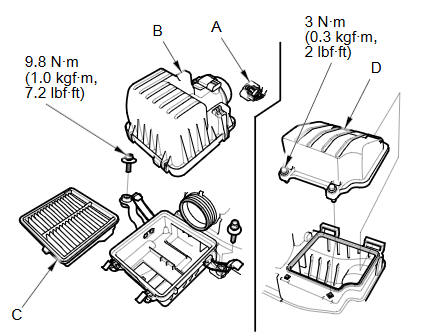
Disconnect the MAF sensor/IAT sensor connector(A), then remove the air cleaner cover (B) and the air cleaner element (C).
NOTE: Be careful not to damage the MAF sensor/IAT sensor on the air cleaner cover.
-
Remove the air cleaner chamber (D).
-
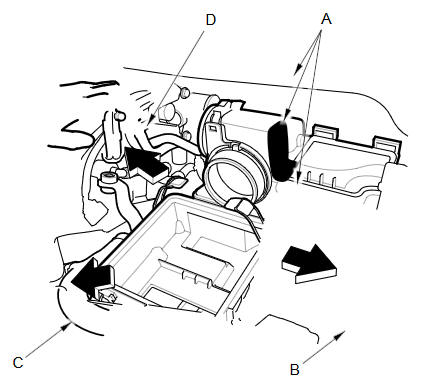
Apply protective tape to the air cleaner, the cowl cover, and the battery terminal fuse box (A) as shown.
-
Remove the battery hold down, and reposition the battery (B). Reposition the radiator upper hose (C), and the breather pipe (D) as shown.
NOTE: Do not disconnect the battery terminals.
-
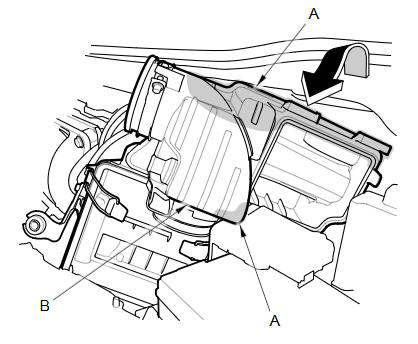
Apply protective tape to the air cleaner (A) as shown.
-
Turn the air cleaner (B) case as shown.
-
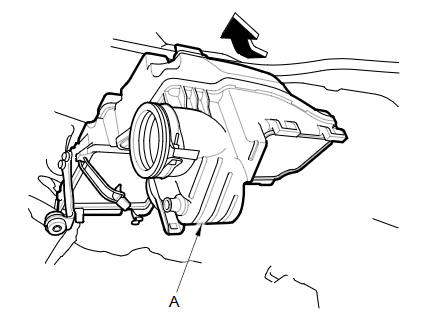
Remove the air cleaner case (A) as shown.
-
Install the parts in the reverse order of removal.
See also:
Driver's Seat Position Sensor Operation Check
Check the driver's seat position sensor after the driver's seat position
sensor replacement.
Make sure the driver's seat is all the way forward position.
Make sure the ...
Center Console Removal/Installation
Special Tools Required
KTC Trim Tool Set SOJATP2014
*Available through the Honda Tool and Equipment Program; call
888-424-6857
Click here for an interactive version of this procedure (M ...
Online Reference Owner's Manual
This owner’s manual should be considered a permanent part of the
vehicle and should remain with the vehicle when it is sold.
This owner’s manual covers all models of your vehicle. You may find ...
Categories
