
Honda Fit: Fuel Pressure Regulator Replacement
-
Remove the fuel tank unit.
-
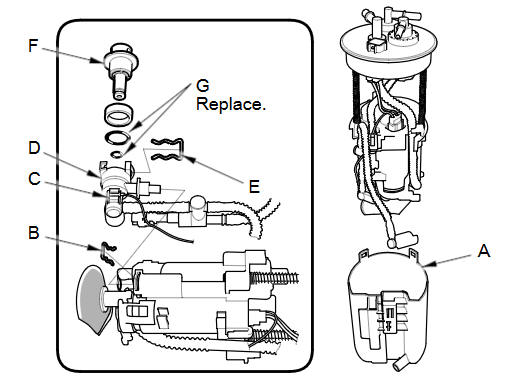
Remove the reservoir (A).
-
Remove the clip (B) and the ground wire (C), then remove the bracket (D).
-
Remove the clip (E), then remove the fuel pressure regulator (F).
-
Install the parts in the reverse order of removal with new O-rings (G) and a new bracket. When installing the fuel tank unit, align the marks on the unit and the fuel tank.
NOTE:
-
Coat the O-rings with clean engine oil; do not use any other oils or fluids.
-
Do not pinch the O-rings during installation.
-
Use all the new parts supplied in the pressure regulator replacement kit.
-
See also:
Lower Front Bumper Grille Replacement
Special Tools Required
KTC Trim Tool Set SOJATP2014
*Available through the Honda Tool and Equipment Program; call 888-424-6857
With Front Fog Lights
NOTE:
Take care not to scratch ...
HFT-Navigation Microphone Removal/Installation (With Navigation)
Remove the front individual map light lens (A) using a flat-tip
screwdriver.
@font-face{font-family:
"Honda_SymbolMarkeng ...
Combination Light Switch Test/Replacement
Remove the steering column covers.
Disconnect the 12P connector (A) from the combination light switch (B).
@font-face{font-family:
"Honda_Symb ...
Categories
