
Honda Fit: EVAP Canister Filter Replacement
-
Remove the air cleaner.
-
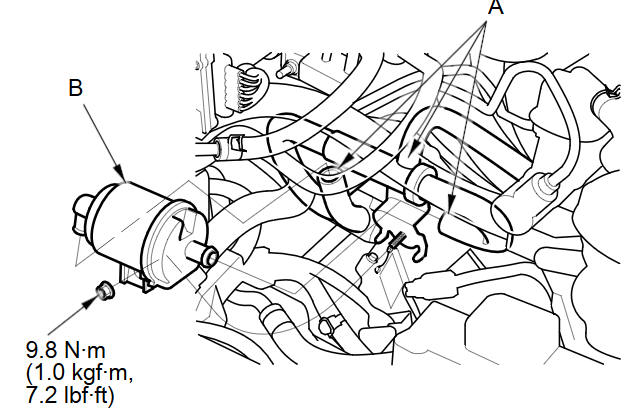
Disconnect the hoses (A).
-
Remove the EVAP canister filter (B).
-
Install the parts in the reverse order of removal.
See also:
Temporarily Repairing a Flat Tire
Canadian models with automatic transmission
If the tire has a large cut or is otherwise severely damaged, you will need
to have the
vehicle towed. If the tire only has a small puncture, from a nai ...
A/C Refrigerant Oil Replacement (With A/C)
Special Tools Required
Oil Injector Tool Robinair ROB16256, commercially available
*This tool is available through the Honda Tool and Equipment Program; call
888-424-6857
Recommended PA ...
Instrument Panel Indicators
The instrument panel has many indicators that give you important information
about your vehicle.
Malfunction Indicator Lamp
Low Oil Pressure Indicator
The engine can be severely damaged if th ...
Categories
