
Honda Fit: About Your Audio System
On models with navigation system, see the Navigation System Manual for operation of the audio system, and Bluetooth®HandsFreeLink®.
The audio system features FM/AM radio. It can also play audio CDs, WMA/MP3/AAC files, iPod®, and USB flash drives.
You can operate the audio system from the buttons and switches on the panel.
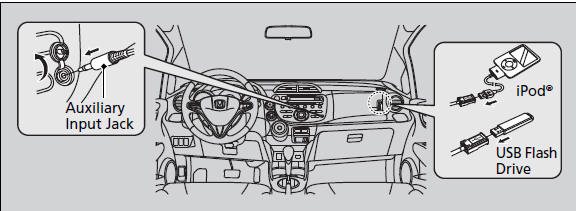
Video CDs, DVDs, and 3-inch (8-cm) mini CDs are not supported.
iPod® is a registered trademark owned by Apple Inc.
State or local laws may prohibit the operation of handheld electronic devices while operating a vehicle.
See also:
Online Reference Owner's Manual
This owner’s manual should be considered a permanent part of the
vehicle and should remain with the vehicle when it is sold.
This owner’s manual covers all models of your vehicle. You may find ...
Brake System
Parking Brake
Use the parking brake to keep the vehicle stationary when parking.
To apply:
Pull the lever fully up without pressing the
release button.
To release:
1. Pull the lever slightly ...
Find Place Commands
Find nearest (specify place):
Auto service center
ACURA dealers
HONDA dealers
Gas station
Hydrogen station
Auto parts & electronics shop
Auto repair & maintenance shop
Car wash & d ...
Categories
