
Honda Fit: Power Windows
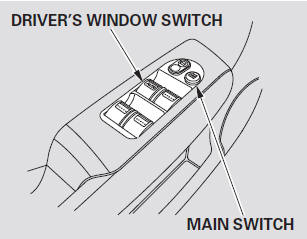
Turn the ignition switch to the ON (II) position to raise or lower any window. To open the window, push the switch down and hold it. Release the switch when you want to stop the window. To close the window, pull back on the switch and hold it.

AUTO -
To open the driver’s window fully, push the window switch firmly down to the second detent, and release it. The window will automatically go down all the way. To stop the window, pull back on the window switch briefly.
To close the window, pull back on the switch and hold it.
When you push the MAIN switch in, the switch is off, and the passenger windows cannot be raised or lowered.
To cancel this feature, push on the switch again to get it to pop out.
Keep the MAIN switch off when you have children in the vehicle so they do not injure themselves by operating the windows unintentionally.
See also:
Accelerator Pedal Module Removal/Installation
Remove the driver's dashboard lower cover.
Disconnect the APP sensor connector (A).
Remove the accelerator pedal module (B).
NOTE:
The APP sensor ...
During Route Guidance
During route guidance, route information is displayed on the map/guidance
screen.
Press the MAP/GUIDE button to display the guidance screen. ...
Categories
