
Honda Fit: Controls Near the Steering Wheel
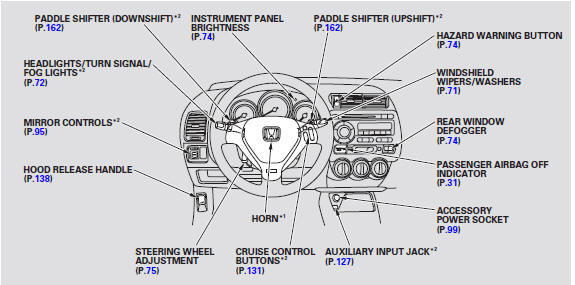
*1 : To use the horn, press the center pad of the steering wheel.
*2 : If equipped.
See also:
Safety When Performing Maintenance
Some of the most important safety precautions are given here.
However, we cannot warn you of every conceivable hazard that can arise in
performing maintenance. Only you can decide whether or not y ...
Audio Antenna
Your vehicle is equipped with an antenna at the rear of the roof . Bef ore
using a ‘‘drive-through’’ car wash, remove the antenna by unscrewing it by hand.
This prevents the antenna f ...
Front Passenger's Weight Sensor Output Check After a Vehicle Collision
NOTE: Check the front passenger's weight sensor output after this action:
After a vehicle collision
Pre-Operation Check Set-up
Make sure all the components of the front passeng ...
Categories
