
Honda Fit: Information Display
The information display shows the odometer, trip meter, engine oil life and maintenance service item codes, and other gauges.
■Switching the Display
Press the (select/reset)
knob to change the display.
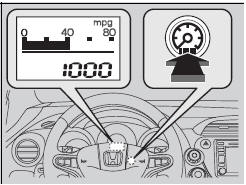
Each time you press the knob,
the information
display changes as follows:
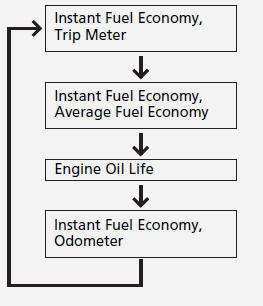
■Odometer
Shows the total number of miles or kilometers that your vehicle has accumulated.
■Trip Meter
Shows the total number of miles or kilometers driven since the last reset.
■ Resetting a trip meter
To reset a trip meter, display it, then press and hold the
knob. The trip meter is
reset to 0.0.
■Average Fuel Economy
Shows the estimated average fuel economy of the trip meter in mpg (U.S.) or l/100 km (Canada). The display is updated at set intervals. When a trip meter is reset, the average fuel economy is also reset.
■Engine Oil Life
Shows the remaining oil life and Maintenance MinderTM.
■Instant Fuel Economy
Shows the instant fuel economy as a bar graph in mpg or l/100 km.
■Check Fuel Cap
Appears when the fuel fill cap is loose or is not installed.
See also:
Tailgate Lock Cylinder Replacement
For Some Models
NOTE: Put on gloves to protect your hands.
Remove the tailgate lower trim panal.
Disconnect the tailgate cylinder rod (A).
NOTE: Check for damaged or stress-wh ...
Interior Lights
Interior Light Switch
■ ON
The interior light comes on regardless of
whether the doors are open or closed.
■ Door activated
The interior light comes on in the following
situation ...
Intake Manifold Chamber Removal and Installation
Exploded View
Removal
Remove the under-cowl panel.
Remove the air cleaner.
Disconnect the engine wire harness connectors, and remove the wire
harness c ...
Categories
