
Honda Fit: USB Flash Drive
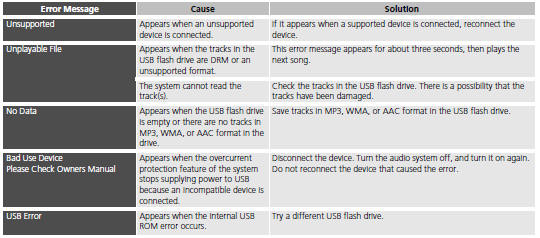
See also:
Front Brake Hose Replacement
Raise and support the vehicle.
Remove the front wheel.
Disconnect the brake line (A) from the brake hose (B), then remove the brake
hose bracket (C).
...
Auto Door Locking/Unlocking
Your vehicle locks all doors and unlocks the driver’s door automatically when
a
certain condition is met.
You can turn off or change to another auto door
locking/unlocking setting using the mas ...
Devices that Emit Radio Waves
The following products and systems on your vehicle emit radio waves when in
operation.
Each of the above complies with the appropriate requirements or the required
standards of FCC (Federal Commu ...
Categories

© 2026 Copyright www.hfitinfo.com