
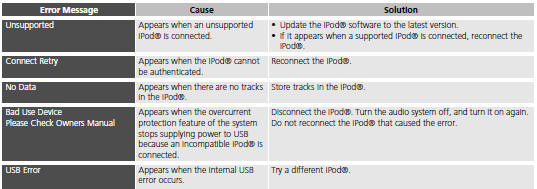
Honda Fit: iPod®
See also:
Braking System
Your vehicle is equipped with front disc brakes. The brakes on the rear wheels
are drum. A power assist helps reduce the effort needed on the brake pedal. The
anti-lock brake system (ABS) helps yo ...
Playing Tracks in Folders
AUDIO button (in USB mode)
►Folder
Change the folder if the tracks are stored in a folder structure.
1. Select a folder.
► The system displays the track
list.
2. Select a tra ...
Selecting a Destination on the Map
Select a new destination when en route by selecting a location on the map.
1. Scroll the map to position the
cursor over your desired
destination, adjusting the map
scale as necessary. Press the ...
Categories

© 2026 Copyright www.hfitinfo.com