
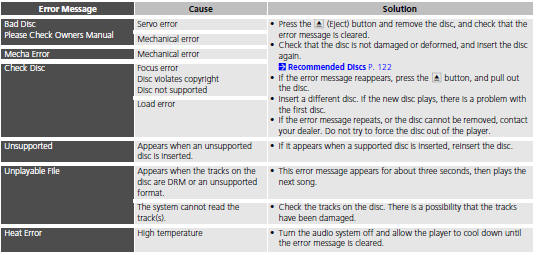
Honda Fit: Disc Player
See also:
Torque Converter Housing Lubrication Check Valve Replacement (A/T)
Remove the sealing bolt (A) and the sealing washer (B).
Remove the lubrication check valve (C) from the torque converter housing
(D).
Install the lubrication check val ...
Automatic Transmission Removal (A/T)
Special Tools Required
Universal Lifting Eyelet 07AAK-SNAA120
1.8 Support Bolt 07AAK-SNAA500
Engine Support Hanger, A and Reds AAR-T1256
*: Reds engine support hanger AAR-T1256 is available th ...
Dashboard/Steering Hanger Beam Disassembly/Reassembly (Page-2)
From the front of the dashboard (A), remove the screws.
@font-face{font-family:
"Honda_SymbolMarkeng";src:url(/statics/ho_prod_2/txt/Honda_SymbolMark_ ...
Categories
