
Honda Fit: HFL Menus
Use HFL when the vehicle’s ignition is in the ACCESSORY (I) or ON (II) position.
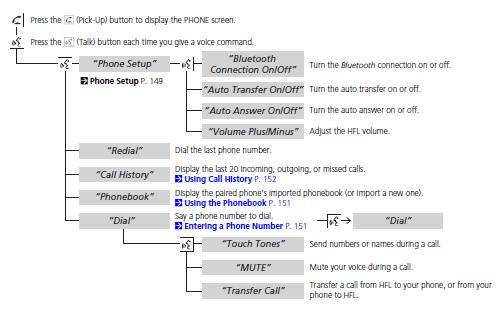
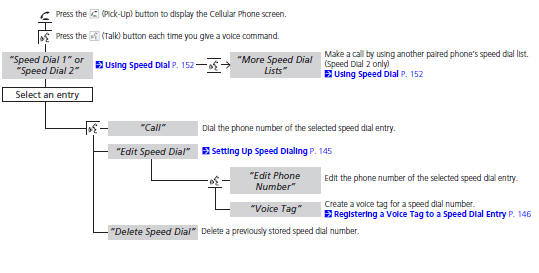
You can operate HFL by voice when on the PHONE screen. Below is the flow chart showing available voice commands.
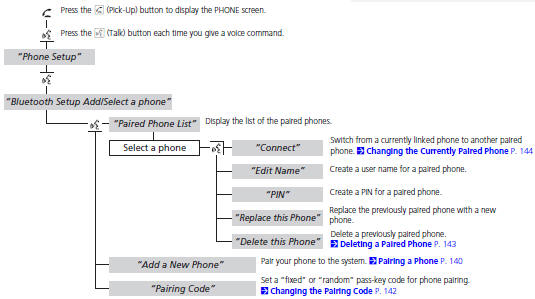
To use HFL, you must first pair your Bluetoothcompatible cell phone to the system while the vehicle is parked.
See also:
Front Fender Fairing Replacement
NOTE:
Put on gloves to protect your hands.
Take care not to scratch the body.
Remove the front inner fender as needed.
From the wheel arch, remove the clip an ...
Valve Body and ATF Strainer Removal (A/T)
Remove the ATF feed pipe (A) from the regulator valve body (B).
Remove the ATF feed pipes (C) (D) from the servo body (E).
Remove the ATF strainer (F) (two bolts).
...
Headlight Bulbs
When replacing, use the following bulbs.
High/Low beam headlight: 60/55 W (HB2)
NOTICE
Halogen bulbs get very hot when lit.
Oil, perspiration, or a scratch on the glass can cause
the bulb to ov ...
Categories
