
Honda Fit: Using Call History
 PHONE button
► Call History
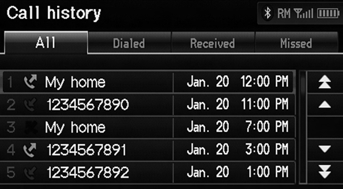
1. Select a call.
Select All, Dialed, Received, Missed to view the call history by category.
2. Select Call to begin dialing.
The call history shows the last 20 calls from your phone.
See also:
Letters
...
Tailgate Dynamic Damper Replacement
NOTE:
Put on gloves to protect your hands.
Take care not to scratch the tailgate or the related parts.
Remove the tailgate lower trim panal.
Remove the bolts, ...
Power Door Mirrors
You can adjust the door mirrors when the
ignition switch is in ON .
■ Mirror position adjustment
L/R selector switch: Select the left or right
mirror. After adjusting the mirror, return th ...
Categories

© 2026 Copyright www.hfitinfo.com