
Honda Fit: Playing Tracks in Folders
 AUDIO button (in USB mode)
►Folder
Change the folder if the tracks are stored in a folder structure.
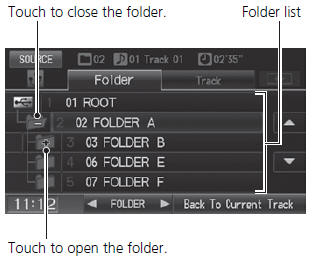
1. Select a folder.
► The system displays the track list.
2. Select a track.
► The system begins playing the selected track.
Folder List
• Any music tracks not in a folder are automatically added to a “ROOT” folder, which is displayed at the top of the Folder List.
• If the root folder has additional folders in a lower layer, they are listed on the screen.
Back to Current Track
: Displays the current track at the top of the list.
See also:
Interior Convenience
Glove Box
Pull the handle to open the glove box.
WARNING
An open glove box can cause serious injury
to your passenger in a crash, even if the
passenger is wearing the seat belt.
Always keep ...
Navigation
This section describes how to enter a destination, select a route to take,
and follow the route to your destination. It also describes how to change
your route or destination along the way. ...
Parking/Side Marker Light Bulbs
When replacing, use the following bulbs.
Parking/Side Marker Light: 3.8 W (Amber)
1. Turn the socket to the left and remove it.
2. Remove the old bulb and insert a new bulb ...
Categories
