
Honda Fit: Audio Screen Control
 AUDIO button (in FM/AM mode)
Control the audio system through the navigation screen.
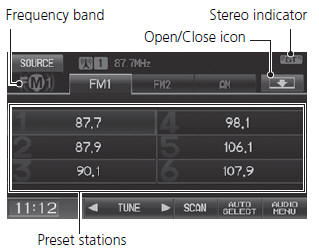
1. Select a frequency band (AM, FM1, or FM2).
2. Select a preset station.
► Touch and hold a preset key until a beep sounds to store the current station in the key.
The following items are available:
• TUNE
: Tunes the radio to the frequency you select. Select
 or
or
 to select a
frequency.
• SCAN
: Scans for stations with a strong signal in the current band and plays a 10-second sample. Select Stop to stop scanning and play the current selection.
• AUTO
SELECT
: Scans and automatically stores up to six AM stations and 12 FM stations with a strong signal in the preset buttons.
• AUDIO
MENU
: Sets the RDS options and sound preferences.
• SOURCE
: Changes the source mode.
• Open
/Close
icon
: Displays/hides the detailed information.
The A.SEL indicator comes on the display when AUTO SELECT is on. If you do not like the stations Auto Select has stored, you can change the frequencies stored in the preset buttons manually.
See also:
Engine Does Not Start
Checking the Engine
If the engine does not start, turn the ignition switch to START
and check the
starter.
If you must start the vehicle immediately, use an
assisting vehicle to jump start it. ...
Driving to Your Destination
This section describes how to follow the route guidance to your destination,
and
choose the icons displayed on the map screen. ...
Exhaust Gas Hazard
Carbon Monoxide Gas
The engine exhaust from this vehicle contains carbon monoxide, a colorless,
odorless, and highly toxic gas. As long as you properly maintain your vehicle,
carbon
monoxide gas ...
Categories
