
Honda Fit: About Your Audio System
The audio system features FM/AM radio. It can also play audio discs, WMA/M/ AAC tracks, iPods®, USB flash drives, and Bluetooth® devices.
The audio system is operable from the buttons and switches on the panel, or the remote controls on the steering wheel.
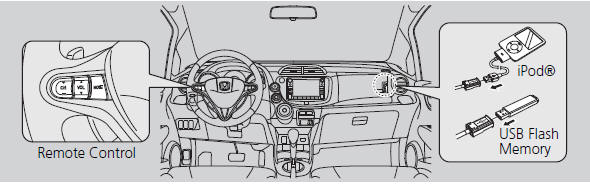
Video CDs, DVDs, and 3-inch/8-cm mini discs are not supported.
Do not leave the iPod® or USB flash drive in the vehicle. Direct sunlight and high temperatures may damage it.
iPod® is a registered trademark owned by Apple Inc.
You can operate the audio system by voice commands.
See also:
Making a Call
Make calls by entering a number or using the imported phonebook, call
history, or
speed dial entries.
You can control the HFL system using voice
commands.
When you say “Call by number”
or ...
Emblem/Sticker Replacement
NOTE: When removing the emblems/stickers, take care not to scratch the body.
To remove the front ёH'' emblem,
remove the front grille.
To remove the rear ёH'' em ...
Passenger's Power Window Switch Replacement
NOTE: The illustration shows front passenger's power window switch.
Remove the door panel:
Front passenger's
Rear
Remove the screws and t ...
Categories
