
Honda Fit: Unverified Area Routing
 INFO button
► Setup ►Other
►Routing & Guidance
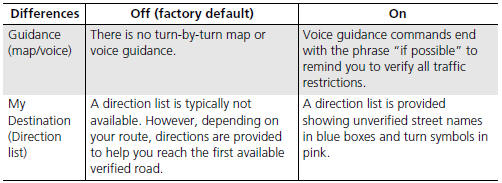
Receive turn-by-turn map and voice guidance in unverified areas.
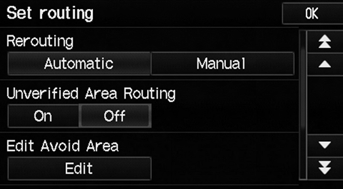
Select On or Off.
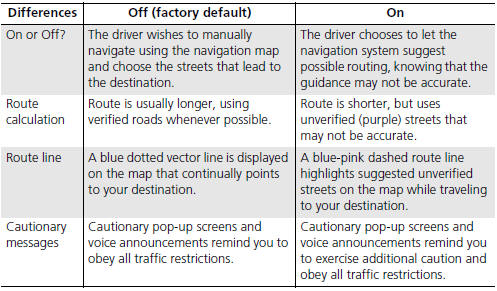
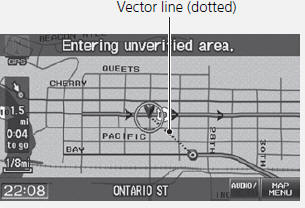
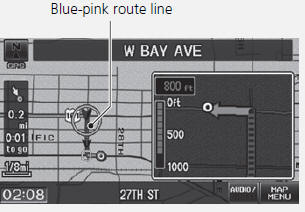
Unverified roads are found in rural areas, and typically include residential streets away from the center of a town. They may not be accurate, and can contain errors in location, naming, and address range.
Unverified roads are shown only when viewing the map in the 1/20, 1/8, 1/4, 1/2, 1, or 2 mile map scales.
See also:
Transmission Side - Release Bearing Removal
Remove the transmission.
Remove the release fork boot (A) from the clutch housing (B).
Squeeze the release fork set spring (C) with pliers to remove the release
...
Airbag System Indicators
If a problem occurs in the airbag system, the SRS indicator will come on.
SRS (Supplemental Restraint System) Indicator
■ When the ignition switch is turned to
ON
The indicator comes on f ...
Rectifier Test
Check for continuity in each direction, between the B terminal and P terminals,
and between the E terminal and P terminals of each diode pair. All diodes should
have continuity in only one ...
Categories
