
Honda Fit: Rerouting
 INFO button
► Setup ►Other
►Routing & Guidance
Set whether route recalculation occurs automatically or manually during route guidance.
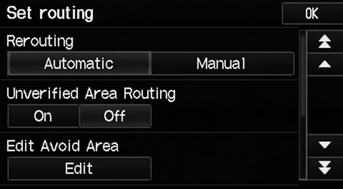
Select an option.
The following options are available:
• Automatic (factory default): The system calculates a new route automatically when you deviate from the route. It is strongly recommended that you leave the system set to Automatic.
• Manual: Disables route recalculation. The system beeps and “Off Route” is displayed when you deviate from the route.
If you live in an area with poor mapping, you may wish to set Rerouting to Manual to avoid constant recalculation. You will need to select Recalc. manually to make the system recalculate your new route.
See also:
Audio Antenna
Your vehicle is equipped with a removable
antenna at the rear of the roof.
NOTICE
Before using a “drive-through” car wash, remove the
antenna by unscrewing it by hand. This prevents the
ant ...
Place Name
DEST button
► Place Name
Enter the name of a place (e.g., business, hotel, restaurant) stored in the
map
database to use as the destination.
1. Enter a place name.
2. Select List to di ...
Categories
