
Honda Fit: User Name
 INFO button
► Setup
►Personal Information►User Name
Change the user name (“User 1” or “User 2”) to your desired name.
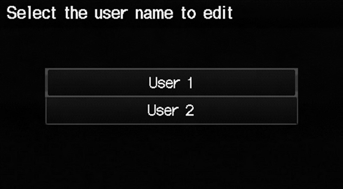
1. Select the name to change.
2. Enter a name. Select OK.
See also:
Removal
NOTE: Do not allow dust, dirt, or other foreign materials to enter the
steering gearbox.
Remove the steering gearbox.
Remove both tie-rod ends from the rack ends.
R ...
Brake/Clutch Fluid
Specified fluid: Honda Heavy Duty Brake Fluid DOT 3
Use the same fluid for both the brakes and clutch.
NOTICE
Brake fluid marked DOT 5 is not compatible with your
vehicle’s braking system and ca ...
Registering a Voice Tag to a Speed Dial Entry
PHONE button
► Speed Dial 1 or Speed Dial 2
1. Select a speed dial entry.
2. Select Edit Speed Dial.
3. Select Voice Tag.
4. Follow the prompt to enter a voice
tag.
Voice tags allow ...
Categories
