
Honda Fit: Canceling Your Route
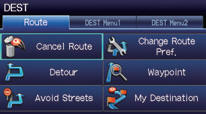
1 Press the DEST button.
2 Select Cancel Route.
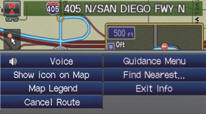
From the map screen:
1 Select MAP MENU.
2 Select Cancel Route.
See also:
Transmission Housing Bearing Installation (A/T)
Special Tools Required
Bearing Driver Attachment, 72 x 75 mm 07746-0010600
Bearing Driver Attachment, 78 x 80 mm 07NAD-PX40100
Bearing Driver Attachment, 62 x 68 mm 07746-0010500
Driver Handle ...
Block and Piston Inspection
Remove the crankshaft and the pistons.
Check the piston for distortion or cracks.
Measure the piston skirt diameter (A) at a point 16 mm (0.63 in)
from ...
Starting the Engine
1. Apply the parking brake.
2. In cold weather, turn off all
electrical accessories to reduce the drain on the battery.
3. Manual transmission:
Press the clutch pedal down all the way. The START ( ...
Categories
