
Honda Fit: Audio Control Display
Press the AUDIO button to display the audio system on the navigation screen.
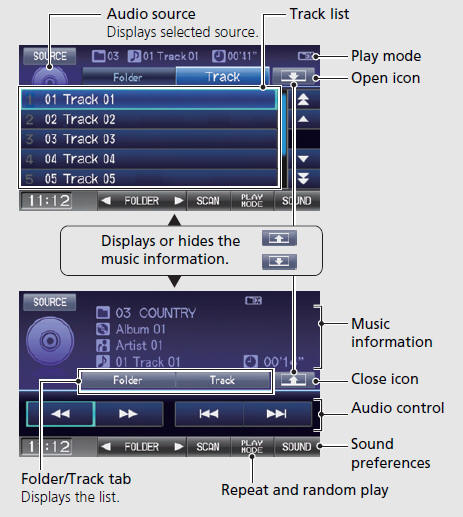
See also:
Reporting Safety Defects
In the U.S.
If you believe that your vehicle has a defect which could cause a crash or
could cause injury or death, you
should immediately inform the National Highway Traffic Safety Administration ...
Service Station Procedures
Refueling
1. Park with the driver’s side closest to the service station pump.
2. Outside of the vehicle, open the fuel fill door by pulling its notched edge.
3. Remove the fuel fill cap slowly. ...
Audio System Theft Protection
The audio system is disabled when it is disconnected from the power source,
such as
when the battery is disconnected or goes dead.
■ Entering the Audio Security Code
ENTER CODE appears on ...
Categories
